



NDI Remote Production: 5-Camera to Studio via NDI Bridge & OBS — Complete Setup Guide 2026

NDI Remote Production: Complete Setup Guide — 5-Camera to Studio via NDI Bridge & OBS
How to transport live SDI video from five remote field locations to a central studio OBS workstation over the public internet using Kiloview P3 Mini encoders, NDI Bridge, and AES-256 encryption — in a workflow that feels like a local LAN.
Remote live production has historically required expensive satellite uplinks, dedicated bonded-cellular services, or proprietary IP contribution codecs that lock you into a single vendor's ecosystem. NDI Bridge changes that equation entirely. By tunneling NDI|HX2 streams over standard UDP/RUDP across the public internet — encrypted end-to-end with AES-256 — you can bring live SDI feeds from anywhere on the planet into your studio as if they were sitting on the same 10GbE switch.
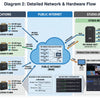
This guide builds the complete architecture described in the End-to-End Remote Production Configuration Manual: five field cameras → five Kiloview P3 Mini encoders → NDI Bridge WAN → Studio NDI Bridge Host PC → OBS Studio. Every section includes hardware specs sourced from the manual, configuration steps, bandwidth planning, and the exact coremicro products that make each layer work.
Why NDI Bridge Is the Right Tool for Multi-Site Remote Production
Traditional remote contribution over the internet forces a choice between quality and complexity. SRT and RTMP encoders are cheap but require a relay server and produce a one-way stream that OBS must decode before it can be switched live. Proprietary bonded-cellular services (LiveU, Dejero) are purpose-built but expensive per unit and locked to a single platform.
NDI Bridge — included free with the NDI Tools package from Vizrt — does something neither approach does: it extends a full NDI mesh across WAN. Once the bridge is established, every remote camera appears in OBS's source list exactly as a local NDI device would. You get tally back-channel, low-latency switching, and zero relay infrastructure to maintain.
Key Architecture Insight: NDI Bridge uses a Many-to-One WAN topology. The Studio PC acts as the permanent "Host" endpoint with a static public IP. All five field Kiloview units are configured as "Join" clients — they reach out to the host, never the reverse. This eliminates the need for static IPs at any field site.

NDI HX2 vs. NDI HX3 vs. Full NDI High Bandwidth — Choosing the Right Version for WAN
Understanding which NDI version to use is the single most important spec decision in a remote production workflow. Each version represents a different trade-off between bandwidth, latency, and network requirements:
WAN Recommendation: Configure every Kiloview P3 Mini to output NDI|HX2. At roughly 11–16 Mbps per 1080p60 stream (H.265: ~11 Mbps; H.264: ~16 Mbps), five cameras consume approximately 55–80 Mbps upload — comfortably handled by any modern broadband or bonded 4G connection. At the studio, NDI Bridge decodes HX2 and re-publishes it as standard NDI on the local LAN for OBS.
Bandwidth Per Stream at 1080p60
Five simultaneous NDI|HX2 streams at 1080p60 consume approximately 55–80 Mbps aggregate (H.265 at ~11 Mbps each; H.264 at ~16 Mbps each) — well within the capacity of a bonded 4G connection or standard 100 Mbps broadband upload. Figures sourced from Vizrt's official NDI HX2 documentation.
Studio System Requirements — NDI Bridge Host PC
The NDI Bridge Host PC is the hub of this architecture. It terminates five encrypted WAN tunnels simultaneously, decodes NDI|HX2, and republishes full-bandwidth NDI streams to the local studio LAN. Undersizing this machine is the most common cause of dropped frames and instability in multi-site NDI productions.
| Component | Minimum Spec | Recommended Spec | Why It Matters |
|---|---|---|---|
| CPU | 16 cores minimum (per architecture manual) | Intel Core i9-13900K or AMD Ryzen 9 7950X (or newer) | The manual specifies "a minimum of 16 cores is recommended for stability and to prevent system overhead bottlenecks." Each NDI stream requires sustained decoding threads. |
| RAM | — | 64 GB DDR5 (128 GB preferred) at 5600 MHz+ | High-bandwidth NDI operations are memory-bound. Fast DIMM speeds reduce latency. 64 GB is the architecture manual's stated requirement. |
| GPU | — | NVIDIA RTX 3080, RTX 4070, or RTX 5000 Ada workstation card — must feature dual NVENC and dual NVDEC engines | Hardware decode of 5× simultaneous streams requires dual NVDEC engines. Software decode overloads CPU. RTX 3080 is the entry point specified in the architecture manual. |
| Network — WAN | 100 Mbps symmetric broadband + static public IP | 250–300 Mbps+ symmetric, static IP, dedicated circuit | Five HX2 streams peak at ~80 Mbps download. Headroom prevents packet loss under burst traffic. |
| Network — LAN | Single 10GbE NIC | Dual 10GbE NICs (Intel X520-DA2 or similar); separate WAN and LAN interfaces | Separating WAN and LAN traffic prevents studio NDI multicast from competing with incoming WAN streams. |
| Storage | 1 TB NVMe SSD | 2 TB NVMe PCIe Gen 4.0 SSD | Fast NVMe prevents OS I/O from introducing jitter into time-sensitive NDI operations. |
| OS | Windows 10 Pro 64-bit | Windows 11 Pro 64-bit | NDI Tools and NDI Bridge are Windows-primary. Hardware acceleration APIs are best supported on Win 11. |
Static IP is mandatory. All five Kiloview P3 Mini units in Join mode must point to a fixed IP address. A dynamic WAN IP will break all five connections simultaneously at each DHCP renewal. If your ISP cannot provide a static IP, a paid DDNS service with automatic router update is an acceptable fallback, but introduces re-connection delay.

Field Encoder — Kiloview P3 Mini 4G Wireless Bonding Encoder
Each remote site in this architecture runs a Kiloview P3 Mini — a compact hardware encoder that accepts 3G-SDI, HDMI, or USB input from any field camera or camcorder and outputs NDI|HX2 over bonded 4G cellular, Wi-Fi, or Ethernet. Its KiloLink bonding technology aggregates multiple network paths into a single resilient connection, meaning an unstable cellular signal at one site doesn't drop the feed — the encoder automatically redistributes traffic across surviving interfaces.
- 3G-SDI (BNC) + HDMI + USB inputs — up to 1080p60
- NDI|HX2, SRT, RTMP, RTSP, HLS, WHIP output
- 3× 4G LTE cellular bonding (KiloLink)
- Wi-Fi + Ethernet multi-path failover
- Web-based management interface
- NDI Bridge "Join" mode native support
- AES-256 key authentication
- Tally light output — mirrors studio OBS
- 5G NR + 4G LTE bonding for higher throughput
- Currently NDI|HX2; NDI|HX3 support coming via firmware update
- Same Join mode / AES-256 key compatibility
- Supports NDI Bridge WAN architecture
- All P3 Mini field features retained
- P3 encoder + 2 installed 4G modem cards
- Ready to insert SIM cards and go live
- Dual-carrier bonding from a single unit
- Saves hardware integration time on-site
Cellular Connectivity Options for Each Remote Site
Each P3 Mini field unit supports three connectivity modes — which you use depends on what's available at each remote location:
- Wired Ethernet — Preferred whenever available. Most stable, lowest jitter. Connect to venue's LAN or a portable 4G router with Ethernet out.
- Wi-Fi — Suitable for indoor venues with strong AP coverage. Vulnerable to interference; use 5 GHz band where possible.
- 4G/5G Cellular Bonding — The P3 Mini's differentiating capability. Insert SIM cards from two different carriers, enable KiloLink bonding, and the unit aggregates bandwidth and automatically reroutes around dropped packets. Recommended for outdoor events, breaking news, and any site without reliable wired internet.
Multi-carrier bonding tip: Use SIM cards from two different carriers in each P3 Mini. If one carrier has congestion or coverage issues at the event location, the other carrier's modem absorbs the traffic automatically. For critical productions, combine an Ethernet feed from venue Wi-Fi with one 4G SIM as a hot standby.
Step-by-Step Configuration — NDI Bridge Host to Field Encoders
Phase 1 — Studio NDI Bridge Host Setup
Configure Port Forwarding on Studio Router
First, install NDI Tools (free from ndi.video) on the studio PC — NDI Bridge, NDI Access Manager, and all supporting utilities are included in this package. Then log into your studio network router or firewall and add a port forwarding rule that maps external UDP 5990 (and the dynamic range 5960–5989) to the internal LAN IP address of your NDI Bridge Host PC. Configure the protocol as UDP or Both. Confirm the studio connection has a static public IP assigned before proceeding.
Configure NDI Access Manager
Open the NDI Access Manager (included with NDI Tools) on the studio PC. Configure any specific NDI Groups or visibility rules required for your local network. This controls which NDI sources are visible to which machines on the studio LAN — particularly important when multiple NDI applications are running on the same subnet.
Launch NDI Bridge — Select Host Mode Tab
Open NDI Bridge and click the Host mode tab at the top of the interface. Set a unique Bridge Name — this prefix will appear on all incoming remote NDI sources in OBS (e.g., a bridge name of MainStudio makes Camera 1 appear as [MainStudio] - Cam 1). Leave the listening port on the default 5990, ensuring it matches your router's port forwarding rules.
Generate and Record the AES-256 Encryption Key
Click Generate Key in NDI Bridge to create a 256-bit AES key. Copy it to a secure password manager immediately. This key is the sole authentication mechanism — any remote unit with a mismatch (even a single character, wrong case) will be completely unable to connect or negotiate streams.
Enable Hardware Acceleration and Start the Host
In NDI Bridge settings, ensure Hardware Acceleration is checked — this offloads HX2 decoding to your NVIDIA GPU's NVDEC engines, freeing CPU headroom. Set the WAN transport codec to NDI|HX (H.264 or HEVC). Click Start. The host status panel will confirm your public IP and active listening port. The studio is now ready.
Phase 2 — Field Encoder Configuration (Kiloview P3 Mini × 5)
Repeat these steps on each of the five P3 Mini units. Assign each unit a unique NDI Group name to identify individual camera positions in OBS.
Connect Camera SDI Output to P3 Mini BNC Input
Use a 3G-SDI (BNC) cable from the camcorder's SDI output to the P3 Mini's SDI input, or an HDMI cable to the HDMI input depending on your camera. The P3 Mini accepts 3G-SDI (up to 1080p60) and HDMI (up to 1080p60). Confirm the camera's output is active in its menu before proceeding.
Access P3 Mini Web UI — Set NDI|HX2 Encoding
Connect a laptop to the same network as the P3 Mini and navigate to its local IP in a browser. Go to the NDI settings page and select NDI|HX2 as the encoding standard. Set your target bitrate to 10–16 Mbps for 1080p60 — this balances quality against the available cellular upload bandwidth.
Configure NDI Bridge Join Mode
Locate the NDI Bridge or Remote Connection section in the P3 Mini web interface. Set the unit to Join mode. Fill in: Bridge Host = your studio's static public IP address. Port = 5990. Encryption Key = the exact key generated in Step 4 (paste carefully — it's case-sensitive). Key (NDI Group) = a unique camera identifier, e.g., Cam 1 for Site 1, Cam 2 for Site 2, and so on. This label becomes the source suffix in OBS (e.g., [MainStudio] - Cam 1).
Confirm Successful Bridge Handshake
On the P3 Mini status page, look for a connected indicator against the Bridge Host IP. On the studio's NDI Bridge Host panel, each connected P3 Mini will appear as an active Join client in the connections list. Repeat steps 5–8 for all five units before proceeding to OBS.
Phase 3 — OBS Studio Integration
Install obs-ndi Plugin
Download and install the latest obs-ndi plugin (also called DistroAV) for OBS Studio from the official GitHub release page. Restart OBS. The NDI Source type will now appear in the OBS Sources menu.
Add Each Camera as an NDI Source
In OBS, click + → NDI™ Source. Name the source (e.g., Remote Cam 1). In the source properties dropdown, locate the stream — it will be identified by the Host's Bridge Name followed by the camera's local NDI Group name (e.g., [MainStudio] - Cam 1). Click OK. Repeat for all 5 cameras. Each feed will appear live in your OBS preview.
Verify Tally Back-Channel
Transition one camera to your OBS Program output. Within 1–2 seconds, the P3 Mini at that field site will activate its tally light indicator — this NDI tally signal travels back through the Bridge tunnel to the Kiloview unit automatically. No additional configuration is required.
Network Infrastructure — Studio LAN Switch for NDI
Once streams arrive at the studio via NDI Bridge, they are republished as full-bandwidth NDI on the local LAN. The studio network switch is the backbone of this distribution layer. Choosing the wrong switch — or misconfiguring IGMP snooping — is the most common cause of NDI reliability issues in production environments.
Netgear is the only switch manufacturer with NDI configuration profiles built directly into hardware, and the only brand officially listed in the NDI Product Finder. For a 5-camera remote production studio, the M4250 AV Line is the right starting point:
- 8× 1 GbE ports, PoE+ on all ports
- Simple managed — IGMP snooping supported
- Powers PoE NDI encoders and decoders
- Sufficient for 5× NDI|HX2 streams on LAN
- 8× 10G Multi-Gig ports
- Required if upgrading to Full NDI HB in studio
- Handles 4K NDI streams without congestion
- Managed — VLAN and QoS configuration
Switch configuration for NDI: On any managed switch used for NDI, disable QoS, disable Jumbo Frames, enable Flow Control, and enable IGMP Snooping. These settings prevent NDI multicast from flooding ports that have no NDI receivers, which is the primary cause of network saturation in larger NDI deployments.
Optional: NDI Decoders for Studio Monitoring and Confidence Displays
With five incoming camera feeds, the production team typically needs wall-mounted confidence monitors in the control room showing each remote feed independently. Rather than running video cable from the OBS PC to every monitor, NDI decoders pull streams directly from the network and output HDMI or SDI to the display — no computer required.
- Decodes Full NDI, NDI|HX, HX2, HX3
- HDMI output up to 4K
- H.265 / H.264 decode hardware
- Web UI management
- NDI, SRT, RTMP, RTSP decode
- Simultaneous SDI + HDMI + VGA outputs
- Feeds legacy SDI monitors and HDMI displays
- Compact rack-mountable form factor
- Records up to 9 simultaneous NDI streams
- Captures all 5 remote cameras + program mix
- SSD storage with optional expansion
- Ideal for event archive and compliance
Troubleshooting — Common NDI Bridge WAN Issues
| Symptom | Likely Cause | Resolution |
|---|---|---|
| P3 Mini shows "not connected" in Bridge status | Encryption key mismatch or port not forwarded | Re-paste the AES key character by character. Verify UDP 5990 port forwarding rule on studio router points to NDI Bridge Host's LAN IP. |
| Streams appear in NDI Bridge but not in OBS | obs-ndi plugin not installed or outdated version | Reinstall latest DistroAV/obs-ndi release from GitHub. Restart OBS fully. Confirm NDI Bridge Host and OBS PC are on the same LAN subnet. |
| Video stuttering or macro-blocking on one feed | Insufficient upload bandwidth at that field site | Reduce that P3 Mini's NDI|HX2 bitrate to 8–10 Mbps. Enable additional cellular modem if available. Check signal quality of 4G connections. |
| NDI Bridge Host drops all five feeds simultaneously | Studio internet interruption or ISP IP change | Confirm static IP on studio router WAN interface. If IP changed, update all five P3 Mini "Bridge Host" fields. Consider a UPS for studio networking equipment. |
| Tally light not responding at field site | Bidirectional metadata not passing through NAT | Tally travels back through the NDI Bridge tunnel. Verify UDP port 5990 and the dynamic range 5960–5989 are all forwarded on the studio router, as some routers block the return RUDP path without explicit rules. Also confirm the Kiloview unit's Bridge connection status shows "connected" in its web UI. |
| High CPU on NDI Bridge Host PC | Hardware acceleration not active | Confirm NVIDIA drivers are current. Re-enable "Hardware Acceleration" in NDI Bridge settings. Verify the GPU has dual NVDEC engines (RTX 3080, RTX 4070, or RTX 5000 Ada are the architecture manual's specified models for this workload). |
Frequently Asked Questions — NDI Remote Production
Can I use the Kiloview P3 Mini with vMix instead of OBS?
Yes. vMix supports NDI natively and will discover all sources republished by the NDI Bridge Host on the local LAN, identical to how OBS does. Add each camera as an NDI Input in vMix. Tally functionality is also supported through vMix's built-in NDI tally system. See our vMix capture card compatibility guide for more on vMix-NDI workflows.
Does this workflow support 4K NDI over WAN?
The P3 Mini targets 1080p60 over WAN via NDI|HX2. For 4K remote contribution, the Kiloview P3 5G model is the recommended upgrade path — it currently supports NDI|HX2 with NDI|HX3 support coming via future firmware update. Once HX3 is available, 4K contribution will require a 5G bonded connection at the field site and 250+ Mbps download headroom at the studio.
How many cameras can one NDI Bridge Host handle?
NDI Bridge Host supports up to 20 Join clients on a single host in the current NDI Tools build. With the recommended i9-13900K + RTX 4070 hardware, 8–10 simultaneous NDI|HX2 streams is a comfortable ceiling with headroom to spare. Beyond 10 streams, consider a second dedicated NDI Bridge Host PC feeding the same studio LAN.
Is NDI Bridge encryption strong enough for broadcast contribution?
AES-256 is the same standard used in government and financial communications. The key-based authentication in NDI Bridge means unauthorized devices cannot join the tunnel or decrypt streams — equivalent to VPN-level security without the overhead of a VPN appliance.
Do I need the Kilolink Station to use the P3 Mini for bonded cellular?
For basic NDI Bridge over cellular, the P3 Mini handles bonding locally using its installed 4G modem cards — no external Kilolink Station required. The Kilolink Station ($799) is a separate bonding receiver for Kiloview's HEVC contribution workflow and is not required for NDI Bridge operation.
Complete Bill of Materials — 5-Camera NDI Remote Production
| Qty | Item | Role | Approx. Price | Link |
|---|---|---|---|---|
| 5× | Kiloview P3 Mini 4G Bonding Encoder | Field NDI|HX2 encoder — one per remote site | $1,199 each | Buy → |
| 10× | Kiloview 4G Module for P3 | Cellular bonding modems — 2 per P3 Mini unit | $149 each | Buy → |
| 1× | Studio PC (build to spec) | NDI Bridge Host — i9-13900K / 64 GB / RTX 4070 / Dual 10GbE | ~$3,500–$5,000 | — |
| 1× | NETGEAR XS508TM 10G Switch | Studio LAN backbone — handles Full NDI HB if upgraded later | $919.99 | Buy → |
| 1× | Static IP / Dedicated Internet Circuit | Studio WAN — minimum 250 Mbps symmetric + static IP | ISP pricing varies | — |
| — | NDI Tools (NDI Bridge included) | Free software from Vizrt — includes NDI Bridge host application | Free | Download → |
| — | OBS Studio + obs-ndi Plugin | Studio production software — free + free plugin | Free | Download → |
Prices are approximate and subject to change. Confirm current pricing at coremicro.com checkout. Volume pricing available for multi-unit orders — contact our team.
Conclusion — Remote Production at Studio Quality, Without Studio Infrastructure Costs
The NDI Bridge WAN architecture documented here represents a genuine step-change in what's achievable with off-the-shelf hardware and free software. Five field cameras, five Kiloview P3 Mini encoders, a single studio PC running NDI Bridge Host, and OBS Studio — that's the complete system. No satellite uplink. No proprietary relay server. No per-stream service fee. The encrypted tunnel handles the public internet transit; NDI handles the switching and tally; OBS handles the production output.
The workflow is proven at scale: sports broadcasts, multi-location corporate events, house-of-worship campuses with satellite locations, and live news contributions all run equivalent architectures today. The key is sizing the studio PC correctly (the i9/RTX 4070 spec in this guide is a deliberate recommendation, not a minimum), using NDI|HX2 over WAN (not Full NDI), and ensuring UDP 5990 (and the dynamic range 5960–5989) are properly forwarded at the studio firewall.
coremicro stocks the complete Kiloview lineup — from the pocket-sized P3 Mini to the 4× 4G bonded P3 bundles — alongside Netgear AV switches and every other hardware layer in this workflow. Our team configures these systems for studios, integrators, and venues across the US every day.
Explore More NDI Workflows at coremicro
- NDI Encoders, Decoders & Converters — Complete List (BirdDog, Magewell, Kiloview, Vizrt, Science Image)
- vMix Capture Card Compatibility Guide — which cards work with vMix 29
- NDI Complete Guide 2026 — protocols, versions, network planning
- Shop all streaming encoders at coremicro.com →
- Shop Netgear AV switches at coremicro.com →
Build Your NDI Remote Production Workflow
coremicro stocks Kiloview P3 Mini encoders, bonding modem modules, Netgear AV switches, and every other component in this architecture. Free expert support on every order. Volume pricing for integrators and multi-unit deployments.
-
Posted in
NDI