



















How to activate Blackmagic Design DaVinci Resolve Studio License Key
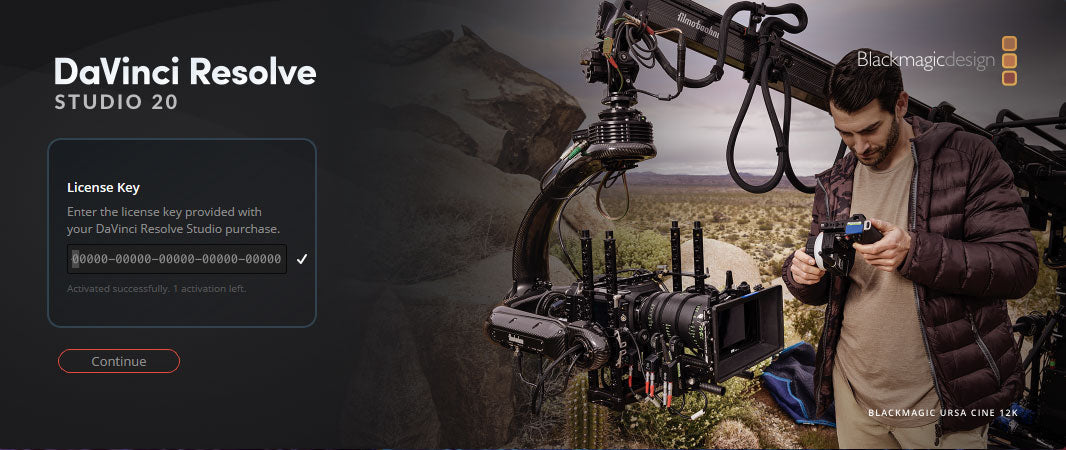

DaVinci Resolve Studio Activation Key
The professional video editing, color grading, and audio post-production suite — fully unlocked with a one-time license key. Compatible with Windows, macOS, and Linux.
What You Get with DaVinci Resolve Studio
The Studio license unlocks every professional feature that the free edition restricts.
Pro Color Grading
Node-based color science with HDR and wide-gamut support — the same tools used on major Hollywood productions.
AI-Powered Tools
Magic Mask, Auto Reframe, Speed Warp, and Scene Cut Detection — all powered by Blackmagic's DaVinci Neural Engine.
Multi-User Collaboration
Editors, colorists, and audio engineers can work on the same project simultaneously — a Studio-exclusive feature.
Lifetime License
Pay once, own it forever. Future version upgrades — including Studio — are included at no extra cost.
🔒 Lost Your Activation Key?
Every license purchased from Coremicro is stored securely on file. If you can't find your key, contact our team and we'll resend it to you right away — no proof of purchase needed beyond your order number.
How to Install & Activate DaVinci Resolve Studio
Follow these steps in order. Most customers are editing within 15 minutes.
-
Place Your Order
Choose the option that fits your setup. Both include a full DaVinci Resolve Studio license. The Speed Editor bundle adds Blackmagic's dedicated hardware editing keyboard, which many editors find significantly improves their cutting speed.
Please note: Activation keys are non-returnable and non-refundable once delivered, as they are single-use digital licenses tied to Blackmagic Design's servers. -
Receive Your Activation Key by Email
Your unique 25-digit activation key will be emailed to you the same day for orders placed Monday through Friday, 9am–4:30pm PT. If prompted at checkout, select "Email Delivery – US Customers Only."
Not seeing the email? Check your spam or junk folder first. If it's still missing after a few hours, contact us here with your order number and we'll locate your key immediately. -
Uninstall Any Existing Version of DaVinci Resolve
Before installing Studio, remove the free version of DaVinci Resolve if it is currently on your computer. This is the single most common cause of activation problems we see — skipping this step can result in DaVinci Resolve failing to recognize your Studio key.
Important: On Windows, use Add/Remove Programs to uninstall. On macOS, drag the application to Trash and empty it. Then proceed to the next step. -
Download DaVinci Resolve Studio from Blackmagic Design
Always download directly from the official Blackmagic Design website to ensure you get the latest, unmodified installer. Avoid third-party download sites — they may offer outdated or modified versions.

-
Select DaVinci Resolve Studio and Your Operating System
On the Blackmagic Design download page, locate DaVinci Resolve Studio and choose your operating system: Windows, macOS, or Linux. Double-check that you select Studio — not the free version listed on the same page.

-
Register or Skip — Then Download
Blackmagic Design may prompt you to register your product. Registration is optional. To download immediately without registering, click "Download Only" in the lower-left corner of the dialog box.

-
Save the File and Extract Its Contents
Once the download is complete, save the installer file to a dedicated folder on your computer. Then extract the contents of the downloaded archive before running anything — the installer will not work correctly if you try to run it directly from inside the zip file.

-
Run the Installer and Select Components
Double-click the installation file to launch the Setup Wizard. You will be asked which components to install. At minimum, select DaVinci Resolve Studio. If you plan to use multi-user collaboration with a shared project server, also check the box for PostgreSQL.

-
Accept the License Agreement and Choose Your Install Location
Review the End-User License Agreement (EULA) and click Accept to continue. Select a destination folder — the default location works for most users — then click Install to begin.

-
Complete the Installation
The Setup Wizard will copy all files to your computer. This typically takes 2–5 minutes depending on your system. On Windows, a restart prompt may appear when it finishes — restart before launching the application to ensure everything loads correctly.

-
Launch DaVinci Resolve Studio
Double-click the DaVinci Resolve icon on your desktop. When the welcome screen appears, click "Skip Tour," then choose "Quick Setup" or "Skip and Start Right Now" to reach the activation screen.

-
Enter Your 25-Digit Activation Key
Open the Coremicro email with the subject line "DaVinci Resolve Studio Activation Key for Your Coremicro Order #XXXXXXX" and copy your 25-digit key. Paste or type it into the activation field when DaVinci Resolve Studio prompts you.
How activation works: DaVinci Resolve Studio performs a one-time online check against Blackmagic Design's servers to verify your key. The process takes only a few seconds. After that, your license is validated locally and you can work completely offline — no recurring check-ins, no interruptions.
-
Activation Complete — You're Ready to Edit
Once your key is validated, DaVinci Resolve Studio launches with all professional features fully unlocked: advanced color grading, the full AI tool suite, HDR and wide-gamut workflows, noise reduction, 3D tools, and real-time multi-user collaboration.

Frequently Asked Questions
Answers to common questions from customers before and after purchase.
Does my existing Studio key work with DaVinci Resolve Studio?
Yes. Any DaVinci Resolve Studio activation key — including those originally purchased for version 19 or earlier — is fully compatible with Studio. Blackmagic Design includes free major version upgrades as part of the Studio license. You do not need to purchase a new key.
Do I need an internet connection to use DaVinci Resolve Studio after activation?
No. An internet connection is only required during the initial one-time activation check. Once your key is validated, DaVinci Resolve Studio works completely offline. There are no subscription check-ins or recurring verifications of any kind.
What if I lose my activation key?
If you purchased from Coremicro, your activation key is safely stored in our records. Contact our team with your order number and we'll resend your key immediately. You will never permanently lose access to a license purchased from us.
Why must I uninstall the free version before installing Studio?
The free and Studio versions of DaVinci Resolve share many of the same system files. Installing Studio without removing the free version first creates file conflicts that prevent the Studio license from being recognized. Uninstalling first takes about a minute and guarantees a clean, error-free installation.
Is this a one-time purchase or a subscription?
This is a one-time lifetime purchase with no recurring fees. Future major version updates — such as moving from Studio 19 to Studio 21 — are included at no additional cost. You pay once and own the software permanently.
Need Help? Our Team Is Here.
Whether you have a question before buying, need assistance during installation, or simply want your key resent — our Coremicro team is available Monday through Friday, 9am–4:30pm PT. We've been helping customers activate DaVinci Resolve Studio since 2014.
-
Posted in
DaVinci Resolve



.
activation key
Thanks, this helps and bought the license key from coremicro.com