





















Product Highlights
- Professional video editing, color grading, VFX, and audio — all in one application
- New Photo page brings Hollywood node-based color grading to still photography
- 9 AI tools including IntelliSearch, CineFocus, UltraSharpen, and Motion Deblur
- MultiMaster trim — deliver HDR and SDR outputs from a single timeline in one pass
- Krokodove motion graphics library with 70+ Fusion compositing tools

Blackmagic Design DaVinci Resolve Studio Activation Key
- SKU:
- BMD-DV/RESSTUD
- MPN:
- DV/RESSTUD
Order Processing: Mon–Fri, 9 AM–4:30 PM PST
Final Sale (Non-refundable digital item)
Available for U.S. Customers Only
Delivery: Activation code sent via email
Product Inquiry Form
Description
Product Overview
Blackmagic Design DaVinci Resolve Studio Activation Key
Official license. One-time purchase. No subscription. Works on macOS, Windows & Linux — activates on up to 2 computers. All future updates included at no extra cost.

Activation key — what's included
Hollywood's #1 Post Solution
High-end professionals working on feature films and television shows use DaVinci Resolve more than any other solution. Emmy™ award winning image technology with 32-bit float processing, patented YRGB color science, and a massive wide gamut color space for the latest HDR workflows. Fairlight audio processing delivers the best sound in the industry — these are the exact tools colorists, editors, VFX artists, and sound engineers use to finish your favorite films and streaming television shows.

We run DaVinci Resolve Studio on multicam broadcast shoots regularly. The MultiMaster trim pass alone saves hours — grade once and simultaneously output HDR and SDR deliverables in a single render. For live streaming setups, Fairlight's folder tracks keep a 32-channel audio session manageable without a dedicated audio engineer. This isn't software we just sell — it's software we use.
All In One Solution for Post Production
DaVinci Resolve is divided into dedicated pages — each a focused workspace for a specific task. A single click switches between them.

Hollywood's most advanced color tools for still photos
The Photo page brings Hollywood's most advanced color tools to still photography for the first time. Work with native RAW files from Canon, Fujifilm, Nikon, and Sony cameras, reframing and cropping at source resolution. Apply the full DaVinci color toolset with Albums, tether a camera for live capture, and collaborate via Blackmagic Cloud. With DaVinci's full AI toolset, ResolveFX, and FusionFX — the only limit is your imagination.

Designed for editors to turn around work fast
The Cut page is built for tight deadlines. Source tape, dual timelines, fast review, and smart editing tools help you work faster than ever. The sync bin and source overwrite tools handle multicam programs quickly. Multi Source is the fastest way to cut to the timeline while cameras are still recording. Every click does something — more time editing, less time hunting for commands.

The world's fastest and most advanced professional NLE
The familiar track layout, dual monitor design, and traditional workflow make it easy to learn while staying powerful enough for feature films, television, streaming, and commercials. Drag and drop editing, context-sensitive trimming, customizable keyboard shortcuts, and a library of hundreds of titles, transitions, and effects — complete with full media management and timeline tools.

Color. VFX. Audio. All in one application.

Hollywood's favorite color corrector
Used to finish more high-end feature films and television shows than any other system. PowerWindows™, qualifiers, tracking, node-based grading, and advanced HDR tools — approachable for beginners, limitless for professionals.

Cinematic VFX and motion graphics
Node-based compositing with hundreds of 2D and 3D tools. Point, planar, and 3D camera tracking; rotoscope; keying; 3D particle systems; and advanced keyframe editors for photorealistic results.

Professional audio post production
Up to 2,000 tracks with real-time EQ, dynamics, and effects. ADR, Foley, Voice Isolation, Music Remixer, IntelliTrack AI panning, and immersive 3D audio including 5th order ambisonics.
Save hours. Every single project.
A full suite of production-ready AI tools built for real broadcast deadlines — not demos.
Resolve FX. Neural Engine. Open ecosystem.
100+ Resolve FX
GPU and CPU accelerated effects — blurs, light effects, noise, image restoration, UltraSharpen, lens flare, face refinement, and more. Applied and animated across Cut, Edit, Fusion, and Color pages.
DaVinci AI Neural Engine
Deep neural networks power facial recognition, object detection, smart reframing, speed warp retiming, super scale, auto color, and color matching — entirely cross-platform with the latest GPU innovations.
Works with 3rd Party Plug-Ins
Compatible with any storage — NAS, SAN, or direct attached. Extend with Open FX and audio plugins, third-party title templates, and workflow APIs. Works with Final Cut Pro, Media Composer, and Premiere Pro.
Wide format support, finishing and mastering
The Media page prepares footage, syncs clips, organizes bins, and adds metadata. The clone palette ensures every bit of camera data is safely backed up. The Deliver page gives total control over encoding options and formats, with a render queue for multiple jobs. Upload directly to YouTube, Vimeo, and X from any page with quick export.
Full feature breakdown
Blackmagic Design DaVinci Resolve Studio — complete breakdown by module.
Photo page
AI tools
Cut & Edit pages
Color page
Fusion VFX
Fairlight audio
System requirements
From indie filmmakers to broadcast networks.
Broadcast & live production
Multicam workflows, real-time color, and full Fairlight audio in a single operator environment.
Post-production & finishing
Node-based color, VFX compositing, and audio mix — no round-tripping between applications.
Streaming & online video
Fast turnaround on the Cut page with simultaneous HDR and SDR deliverables in one render.
Photography & hybrid shooters
The Photo page brings cinema-grade grading to stills — a first for any professional post tool.
Before you buy — answered honestly.
Straight answers from people who sell and use this software every day.
Ready to own it — permanently.
No subscription. No renewal fees. No annual price hike. Add to cart above and your Blackmagic Design DaVinci Resolve Studio activation key arrives by email, usually within one business day.
Questions? Contact the Coremicro team before you buy — we answer every inquiry personally.
Specifications
Blackmagic Design DaVinci Resolve Studio Activation Key Specifications
Reviews
The seller was very attentive and fast.
Everything works. Thanks to CoreMicro for making itclear and ez.
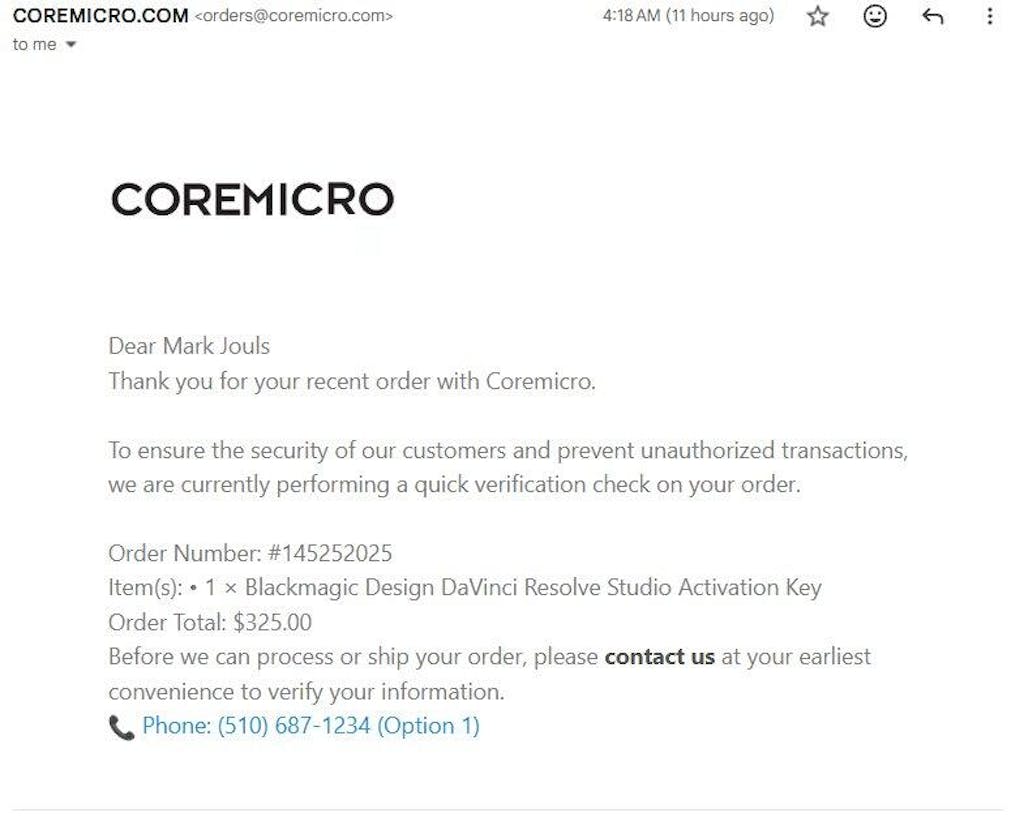
I paid $325 for a DaVinci Resolve Studio Activation Key, which Coremicro advertises as “Electronic Delivery within 1–3 Business Hours (M-F)”.
More than 12 hours later, I still received nothing. Instead, I was asked to call by phone for “verification.” As a deaf and mute customer, I immediately explained that a phone call is impossible for me and offered alternative verification — yet no accessible option or solution was provided.
This not only violates the company’s own delivery promise but also ignores basic ADA accessibility obligations. Because of their inaction, I’m left without the license I needed for a commercial project this weekend — or the chance to buy it elsewhere in time.
I expected professionalism and accessibility. What I got instead was silence, delay, and disregard for customer rights.
I purchased my Davinci Studio license from Coremicro.
I actually tried to purchase directly from Black Magic Design, but for some reason, my PayPal submition hung up in their system, and when I contacted Balck Magic Design support, they explained the situation, and also said that if I tried to purchase again, my payment would be hung again, and there is no way they can recover it.
So they gave me a link for authorized dealers that could seel a license, and Coremirco was the only one that would email my license key to me.
I knew that it would take some time to get it (the websitegave the hours that they could turn it the same day.
It took only 40 minutes from the time I got the purchase confirmation email, to getting the email with the license key. That was pretty quick.
They also sent a link to download Davinci Studio.
Coremicro not only set expectations, but also met the expectations. I had never heard of them before, but I am happy with their service.
Love the product, still learning and will be fir a while.
What's included
Included on Blackmagic Design DaVinci Resolve Studio Activation Key
| Product Specifications | |
|---|---|
Operating Systems |
Mac OS, Windows, and Linux
|
System Requirements |
|
| Physical / Environmental Specifications | |
Dimension |
|
UPC / GTIN |
9338716005042
|